# Header For Mobile / Tablet

<div><figure><img src="https://584379246-files.gitbook.io/~/files/v0/b/gitbook-x-prod.appspot.com/o/spaces%2F8AcakjwUSIs90OK0GJi2%2Fuploads%2FpUGctC4R1vYu2vIITZ8c%2FHeader%20mobile%201.png?alt=media&#x26;token=683ba3e1-9b15-44d2-b7c5-c58152c34d83" alt=""><figcaption></figcaption></figure> <figure><img src="https://584379246-files.gitbook.io/~/files/v0/b/gitbook-x-prod.appspot.com/o/spaces%2F8AcakjwUSIs90OK0GJi2%2Fuploads%2FQwYHQCgGiQyLZ3Iw3AYG%2FHeader%20mobile%202.png?alt=media&#x26;token=28226e6c-421f-466c-ace5-83a6be472251" alt=""><figcaption></figcaption></figure> <figure><img src="https://584379246-files.gitbook.io/~/files/v0/b/gitbook-x-prod.appspot.com/o/spaces%2F8AcakjwUSIs90OK0GJi2%2Fuploads%2F1u2Ae8JGrtW8OS3T9ZQE%2FHeader%20mobile%203.png?alt=media&#x26;token=631bd60d-1aa9-4d09-83d7-e05ce92c70a1" alt=""><figcaption></figcaption></figure></div>

1. From your Shopify admin, go to **Online Store** **->** **Themes**.
2. Find the theme that you want to edit, and then click **Customize**.
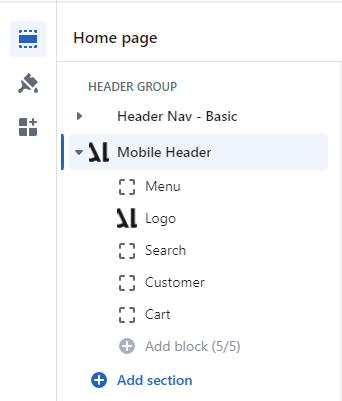
3. **HEADER GROUP ->** **Mobile Header.**

<figure><img src="https://584379246-files.gitbook.io/~/files/v0/b/gitbook-x-prod.appspot.com/o/spaces%2F8AcakjwUSIs90OK0GJi2%2Fuploads%2F2F8t6aZnd8rjJ3P8As0V%2FSetting%20Header%20Mobile.png?alt=media&#x26;token=479e2378-6fac-4f9e-9b19-eba99863a4fe" alt=""><figcaption></figcaption></figure>

{% hint style="info" %}
You can change the position of blocks by dragging them to the position you want
{% endhint %}