> For the complete documentation index, see [llms.txt](https://halosoft.gitbook.io/ella-documentation/llms.txt). Markdown versions of documentation pages are available by appending `.md` to page URLs; this page is available as [Markdown](https://halosoft.gitbook.io/ella-documentation/header/header-for-desktop/home-29-chic-couture.md).
# Home 29 - Chic Couture
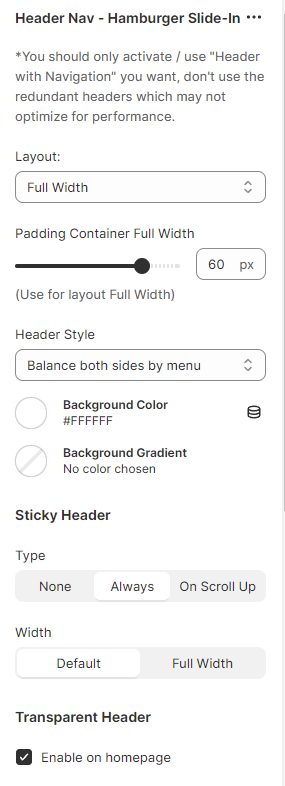
Header Nav - Hamburger Slide-In
{% embed url="" %}
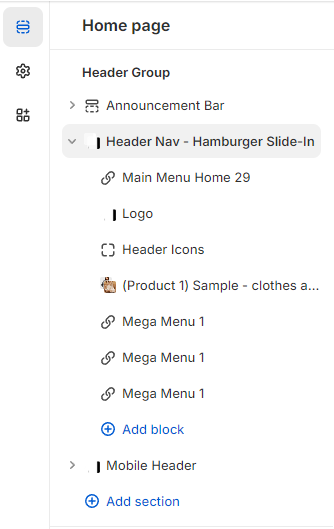
To setup header for Home 29 - Chic Couture, you need to add the **Header Nav - Hamburger Slide-In** section to the **HEADER GROUP**.
1. From your Shopify admin, go to **Online Store** **->** **Themes**.
2. Find the theme that you want to edit, and then click **Customize**.
3. At the **HEADER GROUP ->** click **+** **Add section**.
4. Search and select **Header Nav - Hamburger Slide-In** section.
## Upload Settings For Header
To set up data for Header Home 29 - Chic Couture, please follow below instruction:
1. Click the [file to download](https://halosoft.gitbook.io/ella-documentation/header/header-for-desktop/home-29-chic-couture#preset-for-header-home-29-chic-couture) the corresponding *"json"* of the layout you want to open the data on a new tab.
2. **SELECT ALL** and **COPY**.
3. From your Shopify admin, go to **Themes** **->** **Actions** **->** **Edit Code.**
4. Find folder **Sections** **->** Open file **header-group.json** **->** **SELECT ALL** and **DELETE** then **PASTE** the copied preset from the external file.
## Preset for **Header** Home 29 - Chic Couture