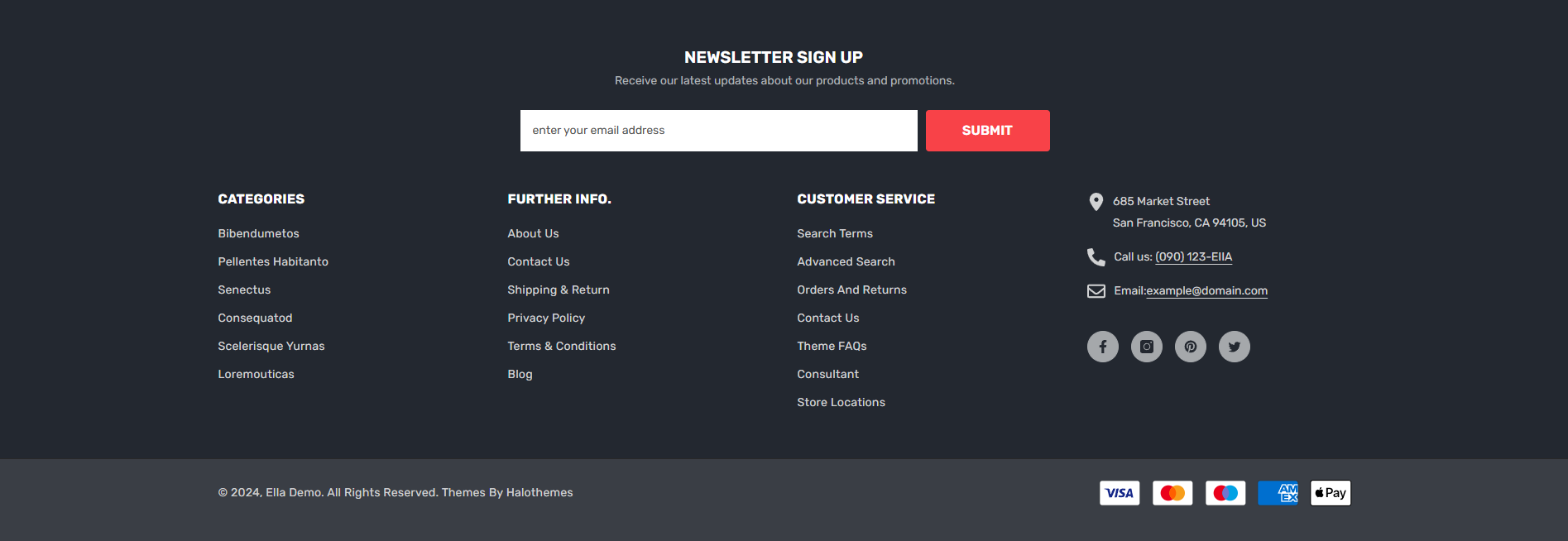
# Home 14 - Automotive 1

<figure><img src="https://3284033180-files.gitbook.io/~/files/v0/b/gitbook-x-prod.appspot.com/o/spaces%2Fag3h7ZduRGWlquTgGUHi%2Fuploads%2FnDd2SitYib1vuz2LwMWi%2Fimage.png?alt=media&#x26;token=14469547-e2cb-4736-a22b-af1ed657dcd4" alt=""><figcaption></figcaption></figure>

To setup Footer Home 14 - Automotive 1, you need to add the **Newsletter** and **Footer 05** sections to the **FOOTER GROUP**.

1. From your Shopify admin, go to **Online Store** -> **Themes**.
2. Find the theme that you want to edit, and then click **Customize**.&#x20;
3. At the **FOOTER GROUP ->** click **+** **Add section**.
4. Search and select **Newsletter** section.
5. Same for **Footer 05** section to add.

<figure><img src="https://3284033180-files.gitbook.io/~/files/v0/b/gitbook-x-prod.appspot.com/o/spaces%2Fag3h7ZduRGWlquTgGUHi%2Fuploads%2FylA8vZag99NsOce3l1Wf%2Ffooter-6-add-section.jpg?alt=media&#x26;token=f4ee4d38-3fb5-4c93-ab6f-2f874599ac11" alt=""><figcaption></figcaption></figure>

► In the **Newsletter** section settings. Add or adjust **Newsletter** block as your need:

<figure><img src="https://3284033180-files.gitbook.io/~/files/v0/b/gitbook-x-prod.appspot.com/o/spaces%2Fag3h7ZduRGWlquTgGUHi%2Fuploads%2FoA9sfQ3C3CyxPVLANYO2%2Ffooter-6-newsletter-section.jpg?alt=media&#x26;token=280a2c7f-fec4-40cc-a587-e101f58a557e" alt=""><figcaption></figcaption></figure>

► In the **Footer 05** section settings. Add or adjust these blocks as your need:

1. **Menu** block: Limit 4. The settings are for the block width, title, and menu selection for menu.

<figure><img src="https://3284033180-files.gitbook.io/~/files/v0/b/gitbook-x-prod.appspot.com/o/spaces%2Fag3h7ZduRGWlquTgGUHi%2Fuploads%2FAK8OsIMzUY5oQldWU7DY%2Ffooter-6-menu.jpg?alt=media&#x26;token=592c43d5-d6de-492f-964f-a41c7130fbbe" alt=""><figcaption></figcaption></figure>

2. **Text** block: Limit 1. The block allows you to upload logo image, address, phone and emails with icons.

<figure><img src="https://3284033180-files.gitbook.io/~/files/v0/b/gitbook-x-prod.appspot.com/o/spaces%2Fag3h7ZduRGWlquTgGUHi%2Fuploads%2FwvKVo5qpP8K9n9ujZHDm%2Ffooter-6-text.jpg?alt=media&#x26;token=80a9a7a8-4a3b-41db-8f85-31101979ba53" alt=""><figcaption></figcaption></figure>

3. **Security trust** block: Limit 1. The settings are simply for choosing image for trust guarantee.

<figure><img src="https://3284033180-files.gitbook.io/~/files/v0/b/gitbook-x-prod.appspot.com/o/spaces%2Fag3h7ZduRGWlquTgGUHi%2Fuploads%2FlSThfCm6VQpWWeDJNUl3%2Ffooter-6-security.jpg?alt=media&#x26;token=f87abcf9-5312-48e8-83d9-60e8b1bbaac7" alt=""><figcaption></figcaption></figure>

4. **Footer Bottom**: Limit 1. The settings are for copyright and payment methods with their positions choice.

<div><figure><img src="https://3284033180-files.gitbook.io/~/files/v0/b/gitbook-x-prod.appspot.com/o/spaces%2Fag3h7ZduRGWlquTgGUHi%2Fuploads%2FxOrSUeyMy9C2iQ2yYJbZ%2Ffooter-6-bottom-copyright.jpg?alt=media&#x26;token=08c0d48a-3a6c-47b1-b412-33e2e434a7ec" alt=""><figcaption></figcaption></figure> <figure><img src="https://3284033180-files.gitbook.io/~/files/v0/b/gitbook-x-prod.appspot.com/o/spaces%2Fag3h7ZduRGWlquTgGUHi%2Fuploads%2FW2cmr0Hxvi1iou6ajjsj%2Ffooter-6-bottom-payment.jpg?alt=media&#x26;token=6682a2f2-3571-4578-9cfa-db66a8246c4e" alt=""><figcaption></figcaption></figure></div>

## Upload Settings For Footer

<mark style="color:red;">To set up data for Footer Home 14 - Automotive 1, please follow below instruction:</mark>

1. Click the [file to download](https://halosoft.gitbook.io/ella-documentation/footer/footer-layout/home-14-automotive-1#preset-for-footer-home-14-automotive-1) the corresponding *"json"* of the layout you want to open the data on a new tab.
2. **SELECT ALL** and **COPY**.
3. From your Shopify admin, go to **Themes** **->** **Actions** **->** **Edit Code.**
4. Find folder **Sections** **->** Open file **footer-group.json** **->** **SELECT ALL** and **DELETE** then **PASTE** the copied preset from the external file.

<figure><img src="https://3284033180-files.gitbook.io/~/files/v0/b/gitbook-x-prod.appspot.com/o/spaces%2Fag3h7ZduRGWlquTgGUHi%2Fuploads%2FRPtqwgG6ABSZWhqME4z6%2Ffooter-group-edit.jpg?alt=media&#x26;token=4d3b1071-06c8-4f29-b2cb-cf36a84c9363" alt=""><figcaption></figcaption></figure>

## Preset for **Footer** Home 14 - Automotive 1
<table><thead><tr><th>Home Page</th><th data-type="files">Json (with .json format)</th></tr></thead><tbody><tr><td><a href="https://new-ella-demo.myshopify.com/?fts=0&#x26;preview_theme_id=123127300186">Home 14 - Automotive 1</a></td><td><a href="https://3284033180-files.gitbook.io/~/files/v0/b/gitbook-x-prod.appspot.com/o/spaces%2Fag3h7ZduRGWlquTgGUHi%2Fuploads%2FlOT6T4zyqqxnHXT4gpgb%2Ffooter-group-14.json?alt=media&#x26;token=3f968fa9-a870-4fec-9734-9d9fb5fb0231">footer-group-14.json</a></td></tr></tbody></table>
