> For the complete documentation index, see [llms.txt](https://halosoft.gitbook.io/ella-7-documentation/llms.txt). Markdown versions of documentation pages are available by appending `.md` to page URLs; this page is available as [Markdown](https://halosoft.gitbook.io/ella-7-documentation/theme-features/quick-shop.md).
# Quick Shop
### How to enable Quick Shop on your store?
* From your Shopify admin, go to **Online Store** -> **Themes**.
* Find the theme that you want to edit, and then click **Customize**.
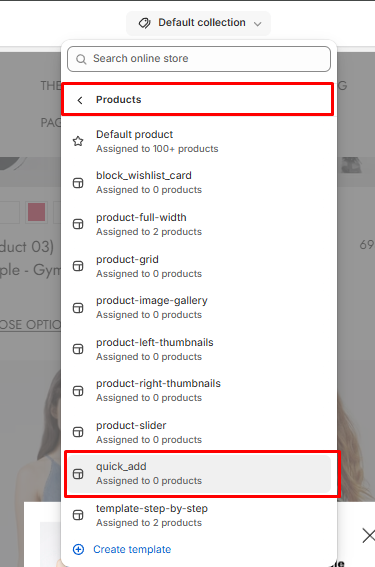
* Go to **Products** -> Select **quick\_add** template
**Note:** In this template, you can add the blocks you want to display in the **Quick Shop Popup**.