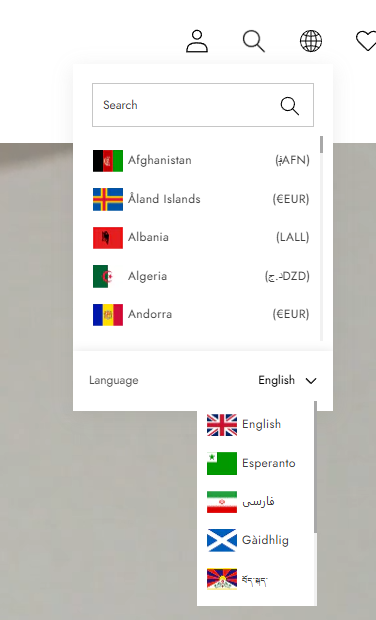
> For the complete documentation index, see [llms.txt](https://halosoft.gitbook.io/ella-7-documentation/llms.txt). Markdown versions of documentation pages are available by appending `.md` to page URLs; this page is available as [Markdown](https://halosoft.gitbook.io/ella-7-documentation/theme-features/multiple-currency-languages.md).
# Multiple Currency / Languages
### How to enable Multiple currency on your store?
* From your Shopify admin, go to **Online Store** -> **Themes**.
* Find the theme that you want to edit, and then click **Customize**.
* In the **Header Groups -> Header -> Localization**
## Header Localization Settings
### Localization
| Label | Type | Description | Visibility |
| ----------------------- | ---------- | ------------------------------------------------------------------------------------------------------------------------------------------------------- | ------------------------------------------------------------------------ |
| Country/region selector | `checkbox` | Enable this option to display a dropdown menu that allows customers to select their shipping destination and currency. Manage countries/regions | Always visible |
| Language selector | `checkbox` | Enable this option to display a dropdown menu that allows customers to switch the language of the store. Manage languages | Always visible |
| Flag | `checkbox` | Enable this to display the country flag icon next to the region or currency name in the selector. | Visible when "Country/region selector" or "Language selector" is enabled |
| Font | `select` | Choose the font family settings (Heading, Subheading, or Body font) to apply to the text in the selector. | Visible when "Country/region selector" or "Language selector" is enabled |
| Size | `select` | Adjust the font size of the text within the localization selectors. | Always visible |
| Localization type | `select` | Choose the visual layout of the selector: **Text** shows the names, **Icon** shows a globe or flag, and **Sidebar** opens the options in a side drawer. | Always visible |
| Position | `select` | Choose whether to align the localization selectors to the **Left** or **Right** side of the header. | Visible when "Country/region selector" or "Language selector" is enabled |
| Row | `select` | Choose the vertical placement of the selectors: in the **Top** bar of the header or in a **Bottom** row. | Visible when "Country/region selector" or "Language selector" is enabled |