> For the complete documentation index, see [llms.txt](https://halosoft.gitbook.io/ella-7-documentation/llms.txt). Markdown versions of documentation pages are available by appending `.md` to page URLs; this page is available as [Markdown](https://halosoft.gitbook.io/ella-7-documentation/product-page/customization-option.md).
# Customization option
Allows customers to personalize products by selecting options or adding custom details before purchase.
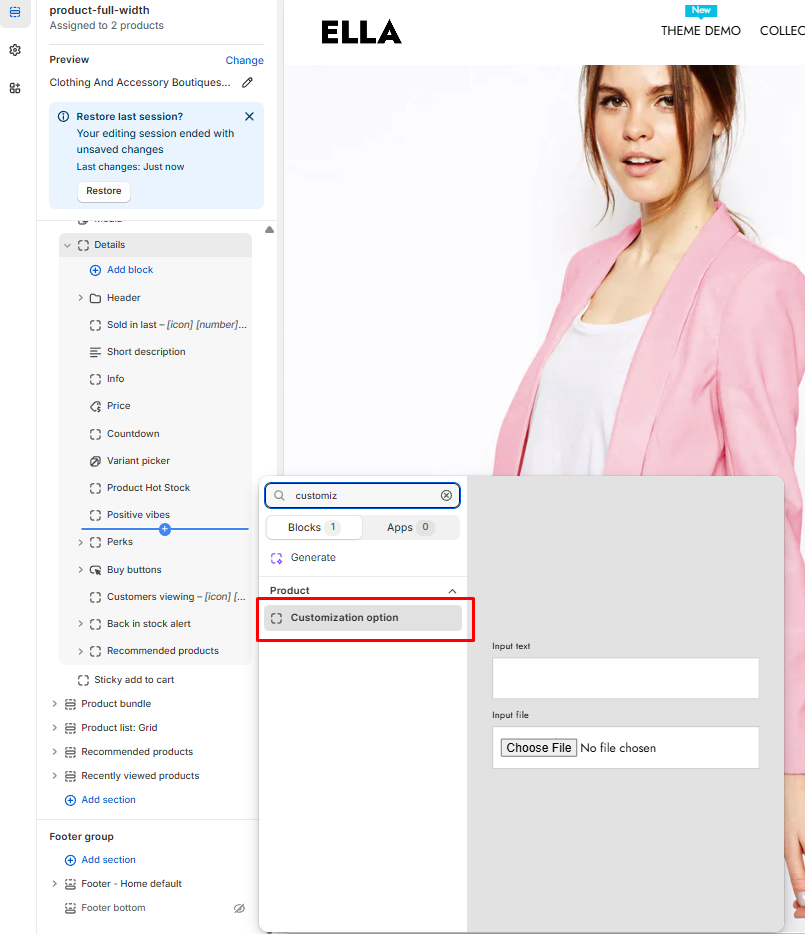
### **How to enable** Customization option**?**
1. From your Shopify admin, go to **Online Store** -> **Themes**.
2. Find the theme that you want to edit, and then click **Customize**.
3. Choose **Products** from the dropdown window.
4. In the **Templates -> Add Product information ->** **Add section Details ->** choose **Customization option**
## Customization Option Settings
### Layout
| Label | Type | Description | Visibility |
| ----- | ------- | -------------------------------------------------------------------------------------------------------------------- | -------------- |
| Gap | `range` | Adjust the vertical spacing (in pixels) between the customization input fields (e.g., text fields and file uploads). | Always visible |
### Padding
| Label | Type | Description | Visibility |
| ------ | ------- | ------------------------------------------------------------------------ | -------------- |
| Top | `range` | Set the internal spacing at the top of the customization section. | Always visible |
| Bottom | `range` | Set the internal spacing at the bottom of the customization section. | Always visible |
| Left | `range` | Set the internal spacing on the left side of the customization section. | Always visible |
| Right | `range` | Set the internal spacing on the right side of the customization section. | Always visible |

 ## Customization Option Settings
### Layout
| Label | Type | Description | Visibility |
| ----- | ------- | -------------------------------------------------------------------------------------------------------------------- | -------------- |
| Gap | `range` | Adjust the vertical spacing (in pixels) between the customization input fields (e.g., text fields and file uploads). | Always visible |
### Padding
| Label | Type | Description | Visibility |
| ------ | ------- | ------------------------------------------------------------------------ | -------------- |
| Top | `range` | Set the internal spacing at the top of the customization section. | Always visible |
| Bottom | `range` | Set the internal spacing at the bottom of the customization section. | Always visible |
| Left | `range` | Set the internal spacing on the left side of the customization section. | Always visible |
| Right | `range` | Set the internal spacing on the right side of the customization section. | Always visible |
## Customization Option Settings
### Layout
| Label | Type | Description | Visibility |
| ----- | ------- | -------------------------------------------------------------------------------------------------------------------- | -------------- |
| Gap | `range` | Adjust the vertical spacing (in pixels) between the customization input fields (e.g., text fields and file uploads). | Always visible |
### Padding
| Label | Type | Description | Visibility |
| ------ | ------- | ------------------------------------------------------------------------ | -------------- |
| Top | `range` | Set the internal spacing at the top of the customization section. | Always visible |
| Bottom | `range` | Set the internal spacing at the bottom of the customization section. | Always visible |
| Left | `range` | Set the internal spacing on the left side of the customization section. | Always visible |
| Right | `range` | Set the internal spacing on the right side of the customization section. | Always visible |